How can I create a sentence template for each person that will include all the census records they appear in in one sentence, like this: “James Reed (or He/She) appeared in the 1880, 1900, 1910, and 1920 census records.”
1 Like
There really isn’t a way to do that. RM’s sentence template language treats each event as an isolated sentence. The best you can do might be to create a new fact called Composite_Census or some such were the only thing that prints is the note, and where you put your preferred sentence into the note. The words “Composite_census” or any shorter version of that concept you might choose would not appear in reports.
In your example, you effectively have a date range of 1880-1920. I would worry about events happening in that date range interrupting the flow of my reports.
I understand your frustration. I periodically am tempted to abandon RM as my genealogy software and replace it with - wait for it - and replace it with Microsoft Word! That way I could make my reports as perfect as I want them. But very quickly, the saner parts of my brain kick in and I stick with RM.
That being said, my RM sentence templates and my RM reports look much different than those for most users. It’s surely not what you are looking for, but you can see an example at Sample RM Narrative Report It’s probably way more verbose than you want, but if you turn the notes off it might be more like you want. It’s point form sentences like: Birth: 1890 rather than He was born in 1890.
2 Likes
You would have to manually construct the sentences. The first one has the [Person] and the [Date] field with a comma at the end. Then the next several fact sentences just have the date and a comma. The last sentence has “and [Date] census records.”
Link each census year as a separate fact and sort the facts in order with no other facts between. Customize the sentences.
1st sentence:
[Person] was found in the< [date:year],
2nd sentence:
[Date:plain:year],
3rd year:
[Date:plain:year] and
Last sentence:
[Date:plain:year] censuses< [PlaceDetails]>< [Place]>.
Put all the notes and link all the sources in the last Census fact.
one workaround would be a custom person note (I personally would do with a script)
or a custom fact and add to note.
Example of custom person note looks like this:
FSID: L14G-PFD
Name: Furtado, Maria
Lifespan: (1906-1975)
Children: 1
Spouse(s): 1
Siblings(s): 8
Type: Blood
Degrees: 6
Kinship: 2x Great Aunt
Thank you Jerry, especially for your sample report. I’m kinda bummed I can’t do that. I have spent untold hours putting every census record in for every person and now I’m wondering I need to be doing that at all, since the reports won’t show them, unless they are sources for marriage or birth or something else.
Thank you for your response. I probably won’t go through all of this because it’s too much extra work. I think a custom note for the person where I identify the censuses might best meet my need for now.
I think I will make a custom note, as you suggested. Thank you very much.
There is always a debate about whether census records are a fact or a source. I think they are both.
One particular census record entered as a fact for one person may or may not tell you all that much, sort of like the sound of one hand clapping. But I think if you enter a whole series of census records as a fact for a person, the records themselves sort of create a story on their own, even if you don’t add any narrative.
If you only enter census records into RM as sources, then they are sources which is good, but I don’t think they tell the same narrative story that way.
I feel the same way about city directory records (which can be much harder to find than census records, depending on where people lived). One city directory record for one person is the sound of one hand clapping. But a whole series of city directory records for one person can be a narrative all on their own without you adding anything - where they lived each year, and what their occupation and place of employment was each year. I even have found city directory records for people as students, when I never knew the person attended college.
2 Likes
Confused abt what you mean by putting every census record in but won’t show— Won’t help now if you are done with census BUT as an FYI in the future as I suspect you are using shared facts—–- besides posting the copy of the census in the principal person, paste it in the individual notes of the witness

You could also use Copy Fact instead of Share
Agree– I use them as both and find a bit annoying Ancestry treats them as residence which they are more than that that.
true – also – I think part of that is less time is spent transcribing and indexing them. Sometimes I will take the extra effort to go page by page (around the letter of surname when necessary) to find things – tedious but often you find that other family groups lived on same street and so one that might not have discovered otherwise
This is almost exactly how I have documented in RM since I started using it about 20 years ago. I keep “long notes” in chronological order and rarely use the notes in the fact section. I use Word and copy/paste to the RM note.
2 Likes
I primarily use Rootsmagic’s narrative report. And the census records, which are shown as facts for each person with the citation as well, do not print in that report. Not that I’d want it to since now it would say “Lawson appeared in the census in 1900 in Hardin County. Lawson appeared in the 1910 census in Hardin County…etc etc.” making the reports really long. BUt I did want to track which census records each person has been found in. So I think the custom note that summarizes it might be the best workaround.
Jerry, I use the narrative report based off your format. Do you have “templates”saved to copy and paste for your fact notes, for example, the death fact? If so, how do you save them? In a text note, or Word?
I type the same things over and over and have been thinking it would be nice to just copy and paste the information headings and then add the data. I have been pulling Florida death certificates from FamilySearch and transcribing the details. Thanks for any advice. I hope this makes sense!
That’s not the way RM’s sentence templates work.
First, you go the Fact Type List.

Then, pick a fact for which you want to define a sentence. Since you mentioned Death, I will use that as my example. After picking the fact, click on the Edit button.

Highlight principal (it’s probably already highlighted, and click the Edit Role button.

Edit the sentence and then click Ok. You will have to click your way out all the popup windows, but after this Ok you are done defining the sentence.

Having defined the sentence for the Death fact one time, you never have to do it again. It will be used for dozens or hundreds or thousands of death facts. It will be used for all the Death facts already in your system, and it will be used for all the new Death facts you add.
Unless you use the default sentences, you will need to define a sentence for the Birth fact and the Marriage fact and the Burial fact etc. But just like with the Death fact, you do each of them only once and your sentence for that fact then applies to all the sentences for all the facts in your database.
I hope I’m answering the question you intended for me to answer. If not, let me know and I will try again.
1 Like
@TMCGOWIN I used template for the 1820, 1830 and 1840 census because like you I got tired of writing out the age groups for each census –my template would have all the age groups for that particular year divided into male and females– the tricky part was remembering to copy the template each time–I saved mine in my email but word, note pad etc would work also
As for Jerry’s way of doing things on Death’s, just make a copy of what he has and then erase all the info added and save your template
I wasn’t sure I was answering the question that was asked, and I’m still not. But the only way to change all your sentence templates is to change all your sentence templates. But it’s only changing the ones you use, and for me it’s maybe a couple of dozen. And you don’t have to make the change for each person. You only have to make the change in the template list and then the templates apply to all your people.
As nkess points out, most of my templates are pretty much identical except for the name of the fact. So when I set mine up, I could mostly copy and paste from one template to the next. The only thing I had to change was the name of the template, so that the birth template would say Birth: and the death template would say Death:, etc. But the part of the template with date and place and place details is the same for all the facts.
1 Like
Jerry, I have my fact sentences set up, but do you save the “headings” for your death record notes in a text file or word file to copy/paste so you don’t have to type all the items each time? This is a clip from your sample narrative report you shared, and you have listed 20 items from the DC. I would like to figure out a way to reduce the amount of typing when I transcribe a death cert or other records and have a place to save the list of items and then just fill in the data. I hope this makes sense! Thank you!
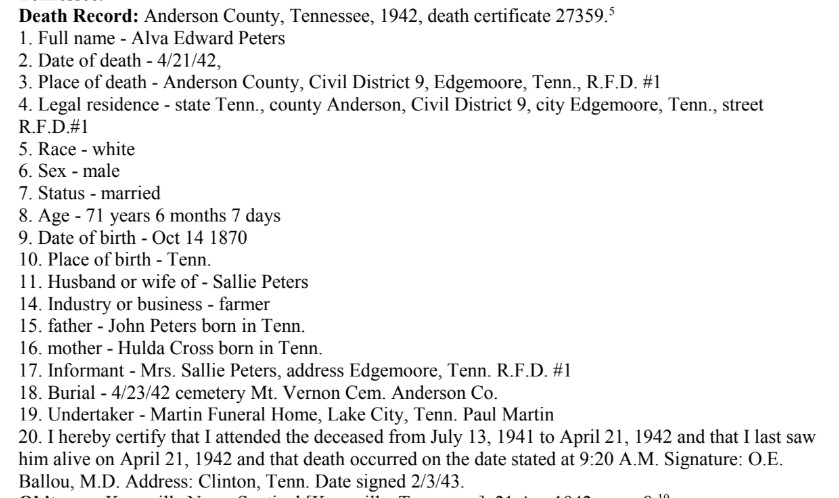
I don’t actually have a death certificate template. The layout of the certificates is similar but not identical from year to year, making it hard to have a single template. Also, the certificates are similar but not identical from state to state.
Instead, when I have a new death certificate I find an existing transcription in RM for the same or similar year and for the same state. I copy the existing transcription out of RM and into Notepad. That’s where I do the transcription of the new death certificate. The old transcription essentially serves as a new template. When I get done working in Notepad, I copy and paste from there back onto the new transcript in RM. This may seem convoluted, but I find it much easier to type transcriptions into text editors than into RM’s note editor.
I usually use Notepad for transcriptions and copy and paste from there into RM. But occasionally I use other tools such as Microsoft Word for transcriptions. Also, census transcriptions go onto my Web site before they are copied and pasted into RM. I have a special text editor I use for my Web site. This is not a Web site made by RM. It’s a Web site made by me.
In any case, it’s always a text editor or a word processor that I use to do transcriptions, and I use a copy of a document I have already transcribed as a template for a new document.
1 Like
So how do you get a narrative report that does NOT print census facts–by marking the fact as private or perhaps the person as living? Do any facts print for the person?
Every time I do a narrative report, it prints every fact UNLESS I mark the fact as private and do NOT check to include private facts-- there are occasions that I would like to print a narrative without facts but can’t figure out how…

