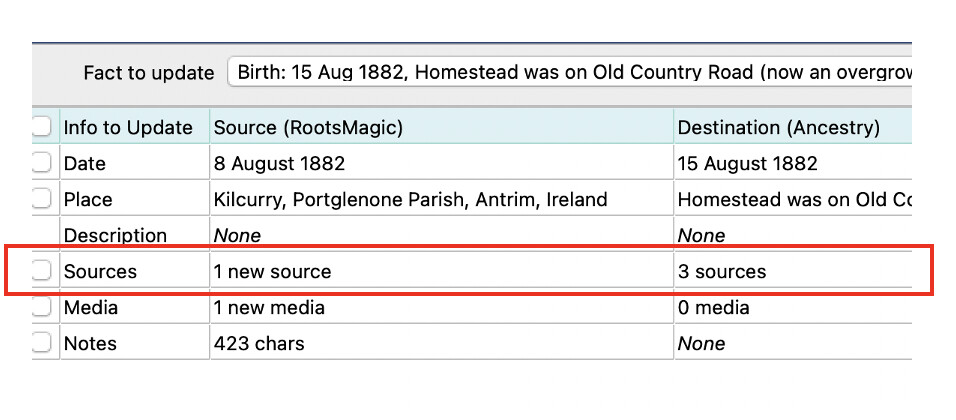
When I am updating my RootsMagic database from Ancestry or vice versa, I get the attached image. This is where the sources has one number on RootsMagic and Ancestry has another number. If I select to update the sources, it just adds the additional source. I have not been updating the sources unless it is a new entry such as a census.
Am I losing something by taking this approach? My concern is if the sources are added to, then I will have to go a delete the duplicate Source. Am I right?
So, with this being a difference, there is one more source in Ancestry than in RM. If I check the box, then one or the other will get an added source. This means taht Ancestray could get to be three while RM will stay as one. Is that not duplicating a source in one or the the other.
It can be confusing, but remember that this screen is showing you the differences between your RM db and your ancestry tree. The pop-up window is telling you that there is 1 source on Ancestry that is not in RM. If you were to select the check box next to Sources and click “OK” on the screenshot provided, TreeShare should add 1 new source to the Birth fact in your RM db. Nothing gets added to Ancestry. Then both should have 3 sources attached to the Birth fact.
It helps to understand what’s going on if you click on the Source (pen) icon on the screen before. It should look something like this…
Pink indicates that there is a difference. When you click on the pink pen icon, you should see 3 sources on ancestry and 2 on RM. While it doesn’t make sense in the above scenario, but in the case where you were wanting to push data from RM to Ancestry you would select a chevron on the left (RM) side of the TreeShare screen. The direction of the Chevron indicates the direction of data flow.
If you are new to Treeshare you might want to check out online help (F1). There is also a video that might help. It’s old, so the UI is different, but the functionality has not really changed.
You need to look on Ancestry at the Fact that has 2 Sources and see what they are.
You have to decide if the 1 in RM is the same or different.
Just don’t look at the screenshot it only has the #.
If you want to know why RM has 1 and Ancestry has 2 - the only way to know what the Sources are is to actually look at them on Ancestry, then compare with RM - outside of treeshare
If you don’t want to do that then don’t worry about the differences.
While you could use the “Edit the RM person” button and/or “Show on Ancestry” button to view the details on the specific platform, there is an easier way. You just click on the pen icon to compare the sources on both RM and Ancestry. (see below) While this view doesn’t list the entire source/citation details it usually provides enough detail to help you decide if you need to TreeShare and data and also in which direction you want the data to transfer.
Also the “Update existing event” pop up display can vary depending upon the direction because it lists what’s “New” on the Source side and what “Currently exists” on the Destination side. For the example, for the event shown above, clicking on the Left Chevron (RM side) displays (1) new source. There are in fact 2 sources in RM but only 1 is new (i.e. not currently in the Ancestry record).