I need someone to refresh my memory please. I want to create a marriage source that I can use over and over again. I don’t like having dozens of marriage sources from every couple. I don’t care what gets printed or not in a report. I really don’t do many reports. Btw, I am using RM10. Thanks!
Lumping or splitting sources is really a continuum. Sources can be more nearly split or more nearly lumped.
But let’s say you have 5 marriage records from a courthouse in one county and state, and 4 marriage records from a different courthouse in a different county and state. That would typically end up being 2 sources - 1 source for each of the 2 courthouses, and 9 different citations, 5 citations for one courthouse and 4 citations for the other courthouse. Is that what you have in mind?
1 Like
Here’s an example using the basic database template, modified like this:
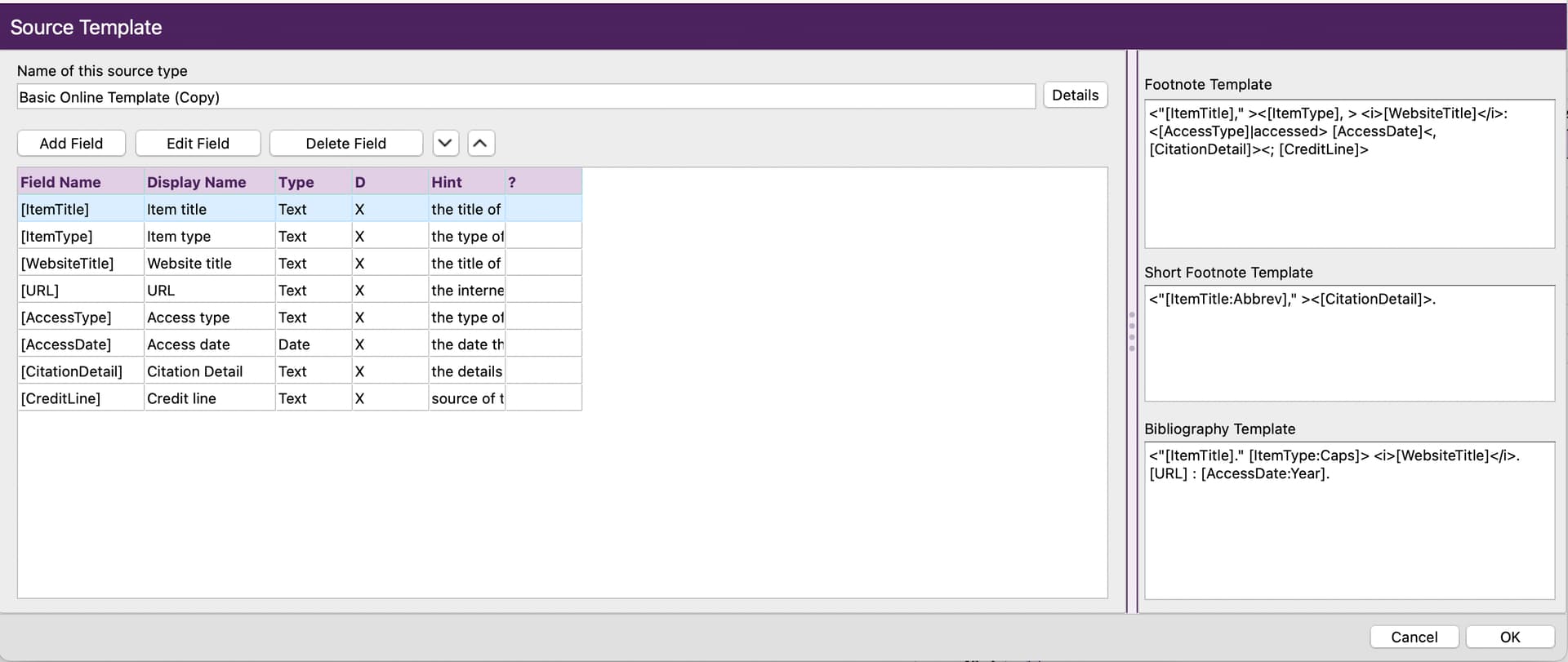
Everything goes into the citation.
Here is an example using it. Once source, currently about 50 citations:

I do the same by modifying the census templates, vital record templates, etc. It’s working really well and I’m quite pleased with this method.
1 Like
Something like that would work. Think I was looking to have just one source that would handle any state, county, court house etc..
1 Like
yes it certainly is – so many paths and ways to divide (split) or lump.
In most cases there is no wrong or right way - but what every is decided one should try to be as consistent was possible.
I will be doing my census in the near future. I will do by location instead of decade/year. That what I can see all years in same location and spots thing vs doing be decade.
Kevin
1 Like
That would certainly work just fine. What you are going to end up with is essentially one census source and a gazillion different census citations. There is nothing wrong with that.
I actually go the exact opposition direction. I’m a source splitter. So I have a gazillion census sources with only one citation for each source.
Curiously, it seems to me that being an extreme source splitter and an extreme source lumper are about the same thing. So where an extreme splitter might have 100 sources with 1 citation each, an extreme lumper might have 1 source with 100 citations. The that the data that a splitter puts into sources is the exact same data that lumpers put into citations. Most users seem to go somewhere in the middle, like with my admittedly unrealistic example they might have 10 sources with 10 citations each. But no matter how you do it, you end up with 100 citations, whether it be 100 x 1 or 1 x 100 or 10 x 10.
I frequently wonder why this whole source vs. citation thing couldn’t go away and why the model couldn’t just be to have references. Doing it that way would really be like extreme splitting and it would also really be like extreme lumping. What it wouldn’t be like is the way the model is now where you have sources that are then sub-divided into citations.
1 Like
Either way will obviously work just fine. And either way is a combination of partial lumping and partial splitting. Complete lumping would be to have just one generic census source and all other data in the citation. Complete splitting would be to have all the data in the source and no data in the citation.
But even as a complete splitter, I have to decide if my final footnote sentence lists the year/decade first or the place first. For reasons I do not totally understand, I have chosen to list the year/decade first and the place second I think my subconscious rationale is something like the following. I always start a new census source (which is also a citation because I’m a splitter) by copying an existing source. U.S. census vary a great deal from census year to census year, but the data elements are the same for the whole country within the same census year. So even if I copy an existing source for a totally different place, the data elements will really all the the same as long as it is for the same census year/decade. So I’m looking for the same census year to copy first, and then I’m looking for the same census place second if possible.
1 Like
yes agreed and some people prefer extreme splitting and in some situations the use of is more appropriate (well in my opinion). Some software even expects extreme splitting.
I love your idea! Since I do not plan any publishing, this was just to answer a great-grandfather question then I got hooked. I have more like ‘VERY basci’ sources and I (BAD I KNOW), not a lot of that info gets entered either. If I tell them it is in the 1940 Massachusetts census I figure they (my kids/grands/greats) can find it just as I had to do!They will have fun researching instead of me handing it all to them!
1 Like
My sentiments exactly. I am going for the generational links. I spend time on solving the blood lines; others who use my information should verify it for themselves. If one wants to join a lineage society, that person will need to find paper or online documents for each. generational link. Early on I would print out reports I might later choose to share, and see what the footnotes looked like. Readers of one’s reports usually are not interested in pages of sources/citations.
I agree with you there! I dont add much source information, but I do verify the sources in FamilySearch and Ancestry. I am using Roots Magic 10 for a DNA project and Name Study. I use Family Search as my ID numbers. I add line items into RM10 for events, but not the source information. I am looking to solve blood lines and connections, and verify the sources in FamSearch and Ancestry. I then use Ancestry Pro Tools in shared matches to find DNA matches that have common ancestors. When I am ready I then then create or update the profiles in Wikitree with the source information from FamSearch and Ancestry. I use color coding on trees to identify DNA Match, unverified trees, DNA confirmed, MRCA and EKAs. That way I can tell at a glance which children of a family group has DNA connections. The DNA features in RM10 is a really big deal to me and I would like to see more enhancements on this feature in the future.
I would love to just put in the complete reference note as in EE and not have templates and sources. I use free form, by the way, so I guess I’m a lumper.
You can put the complete reference note in as in EE using the free form template. Just put everything in the Footnote field and put nothing in the Page Number Field. However, that will make you into a splitter.
I share your sentiments, and I am a splitter. I don’t use the free form template, but I am still a splitter. For the most part, doing citations that way is what makes sense to me. And I have even commented that EE doesn’t really talk about templates and footnote fields and page number fields and splitting and lumping. But in a certain sense, any comments I have made to that effect are wrong and in a certain sense EE does speak to things like footnote fields and page number fields and splitting and lumping. However, the distinction is very subtle in EE.
Namely, EE talks about both footnote sentences and bibliography sentences. In the third edition at least, EE actually seems to prefer the term source list to the term bibliography. But it amounts to being the same thing.
It’s hard to see how to generate a proper bibliography from split sources. RM certainly can’t. So by being a splitter and an RM useer, I have made it impossible to create a bibliography. I can only produce footnotes or endnotes. So to be able to produce both EE compliant footnotes and EE compliant bibliographies, you can’t be a splitter. For example, if you are a free form user, you have to put the bibliography sentence into the Footnote field and everything else into the Page Number field.
1 Like
I have parish register marriage sources by church (one per church) and also one source for the government national marriage register. Many people have both, some only one.
For census I have split to one source per census year and county (UK) to make things more manageable.