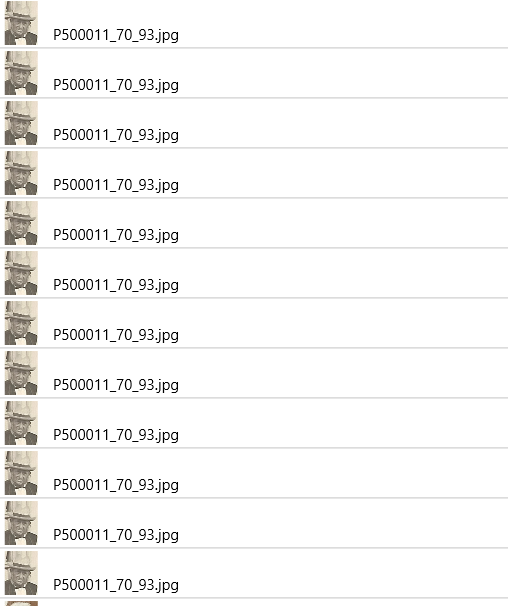
I have many duplicate photo-links like this
-
is it possible to mark more than one to delete?
-
how can I delete all broken links
many thanks
Thomas
I have many duplicate photo-links like this
is it possible to mark more than one to delete?
how can I delete all broken links
many thanks
Thomas
Not sure how you got the duplicate links and where exactly they are showing. If they really are duplicate links like on a source if you remove one link it should remove all the duplicate links.
RM has two kinds of “media links”. One kind is where RM links to files on disk. These kinds of media links are usually called media links in the RM user interface. The other kind is where RM links a media file to a person or a fact or a citation, that sort of thing. These kinds of links are usually called media tags in the RM user interface.
I can’t see enough context in your screen capture to determine if I am looking at the “media link” kind of links or the “media tag” kinds of links. I would need more context about these duplicate links to be able to make a guess about what caused them and to make a possible recommendation about how to fix the problem.
Can you expand your screen capture to include enough of the screen to see the full context of the problem?
this is not a simple problem to delete all but the one you need to keep.
For me I have seen this happen a ONLY couple times because I only add media via DRAG N DRAG which prevents that from happening. it is only when I use one of the other methods my media has gotten duplicated. It is hard to tell for certain exactly what is going on from the screenshot.
I’m following up on and agreeing with the message from kevync1985 that if the duplicate links are the links from RM to the files on disk, it is not at all a simple problem to fix. That’s why I wanted to be sure whether it was the links to the files on disk or the tags to the items in your RM database before I started talking about solutions.
If your problem is duplicate links to files on disk, the typical problem is using Add New Media to add the same file more than once. If you want to reuse the same media more than one place in RM, the after the first time you link it you either need to Drop New Media or else to Select Existing Media. The reason why Add New Media will create duplicate media links and Drop New Media will not create duplicate media links is unknown to me.
The fix is going to be messy. You will have to delete all the media links for the file except for one. The problem will be that those media links you are linking will have media tags (links) to items in RM such as people, facts, citations, and sources. Those media tags (links) will be lost when you delete the media links to files on disk and you will have to re-establish them from the media links to files on disk you didn’t delete. So you will have to develop a work flow to keep track of which of the links and retagging you have completed and what is still to be done.
I’m not sure, but I don’t believe this problem is caused by any sort of import activity. So the most likely culprit is using Add New Media for a file that is already linked. The problem wouldn’t exist if Add New Media worked like Drop New Media in the sense that it would not create duplicate media links. The problem would still be there but could be solved easily if there were a Merge All Duplicate Media lInks tool, but there is not.
Please take a screenshot that includes the side panel as that will show the # of links to the image.
2 - delete broken links - select those with the red X, right mouse and delete
In addition to what has been said:
First of ALL if you have run tools and you have BROKEN MEDIA LINKS
I would not run that tool until this has been resolved.
Kevin
Hi together,
here is the extended screenshot:
it is really so, that the same file exist in multible folders.
I’m ongoin with filetools in Windows to remove duplicate files
the missing files appears in RM as not linked.
How can I remove the ca. 6000!!! links?
or
otherwise all links and I will add my kernel-family manually
I think I have understanding (maybe not complete) of what is going on.
Are you going to leave the same file (filename) in the multiple folders?
or do you intended to move them elsewhere? It would be ideal to not have duplicate filename in the same Parent/child folder/subfolder. I might be able to come up with something in excel that will help tell you more info
nein ich habe alle doppelten files mit identischem filename und 90% intentisch Photo-Inhalt
entfernt (deswegen sind in RM die links broken
it almost sounds like it best to remove all media from RM. Make sure things are clean.
Either add all desired media to Gallery then link or relink one by one if majority of files are that messed up. Either way its going to be painful

wie entferne ich alle Medien aus RM ?
You probably need to remove all media that is duplicated and broken and see where things are.
I would probably copy “needed” media to to folder structure and parent path making sure files are not in more than one subfolder. Without seeing what going exactly I can not give good advise – this might be something that would be best if there is tech or genealogy group the would need to understand both software and computer. (also speak in native language to make things are not misunderstood)
So, I have many duplicate file links that show in the Media File section of RM. But each link, although appearing to be duplicate, is attached to a different tag to a citation, fact, person, place, etc. And I’m just fine with it since all of the duplicate file links point to specific non-duplicated file in my Media folder. In my case, duplicate files were downloaded via TreeShare. Almost 30% of the files were duplicated. So, I eliminated the duplicate files in the media folder and updated the file links to point to the intended file name. Others may not care about the duplicate media files but I do. I use the Duplicate File Finder++ to move duplicate files to an off-line storage device.
so ähnlich habe ich das auch gemacht. Im Medienordner gibt es nur Unikate.
Jedoch bleiben die rund 6500 broken links in RM erhalten.
Wie hast Du die weggekriegt? Wahrscheinlich waren es weniger.
Ich bin ziemlich ratlos. Meine Datei ist mit TreeShare nicht komplett hochzuladen.
***IF* multiples of the thumbnails (marked as Broken Link or have Red X) share Filename paths that are the same (but wrong duplicate photo)… I think you could use
Media>Tools>Search and Replace
(to change them all to match working photo path).
THEN
Media>Tools>Build Thumbnails
Example:
Would be a bit less work, I think.Hi Thomas. I have read this discussion a few times and it seems like there are several problems:
Problem 1- you had the same media images stored in multiple folders on your system and linked a bunch of the media to your RM file multiple times from those different folders. Your post from yesterday states that you have removed all duplicate files with identical filenames. That’s good.
Problem 2 - you now have many broken links in your RM file. The “Enhanced Properties List” is your friend (Tools menu, Other Tools). Run the tool, go to the Media section, and click on the Missing Media items “View” link. This will show you the folder where each media file was located when it was initially attached to your RM db. Fixing the links should be relatively easy assuming that you know the correct file location. Run the “Fix Broken Media links” tool, select the “search a select folder” option, and navigate to the new location (or the top-level folder if there are multiple folders). You could also use “Search and Replace” as Kevin noted above, but this is a global search and replace across your entire db so I suggest using the “Fix Broken Media links” tool unless you are really confident. If you have lots of different media images with broken links then it may take several iterations of viewing the “Enhanced Properties List” and running the “Fix Broken Media links” tool.
Problem 3 - The Media Gallery of your RM database shows the same image many times and each instance has only 1 tag. This could be the result of Problem#1, or from selecting the “Add New Media” option rather than “Existing Media” as Jerry noted, or from a combination of both of these. Regardless of how it happened, this problem should be cosmetic only and I suggest that you ignore it until all of the rest of the world’s problems have been solved 
Problem 4 - Your RM file can’t be uploaded completely with TreeShare. It’s not clear if this problem is related to problems#1-3. Some RM users have reported problems with Treeshare uploads that RM is investigating. Let’s get the media items fixed first and then if you are still having problems with Treeshare you can give us the details of what you are experiencing.
Just to amplify my suggestion. It is for the case when exact same photos have DIFFERENT filenames. And the time savings would be IF there are multiples of these DIFFERENT filenames that are now reported as thumbnail broken links but can just be relinked by modifying their filepaths to point at the path of their “companion” photo that is properly linked already.
This is what ~Fix Broken Media links~ cannot do, because it relies on looking for the same filenames as originally linked and not the actual filenames that have changed and now do not match those of the original thumbnail.
ich habe eine spezielle Lösung zum Löschen der 6500 Medienlinks gefunden.
Mit dem Tool ReMouse können Maus-Click-Folgen aufgenommen werden:
ich habe Click oben links Thumbnail und Click “yes” aufgenommen und 7000 mal wiederholen lassen. Dann hat der Computer 2 Stunden gearbeitet.
Nun sind alle Links weg und ich habe begonnen, meine direkten Vorfahren wieder einzubinden.
ich habe eine spezielle Lösung zum Löschen der 6500 Medienlinks gefunden.
Mit dem Tool ReMouse können Maus-Click-Folgen aufgenommen werden:
ich habe Click oben links Thumbnail und Click “yes” aufgenommen und 7000 mal wiederholen lassen. Dann hat der Computer 2 Stunden gearbeitet.
Nun sind alle Links weg und ich habe begonnen, meine direkten Vorfahren wieder einzubinden.
Jedoch habe ich nun ein weiteres Problem:
meine Anzahl People hat sich verdoppelt.
ja hier ist alles doppelt:
Wie kann ich dies doppelten Einträge bereinigen??


