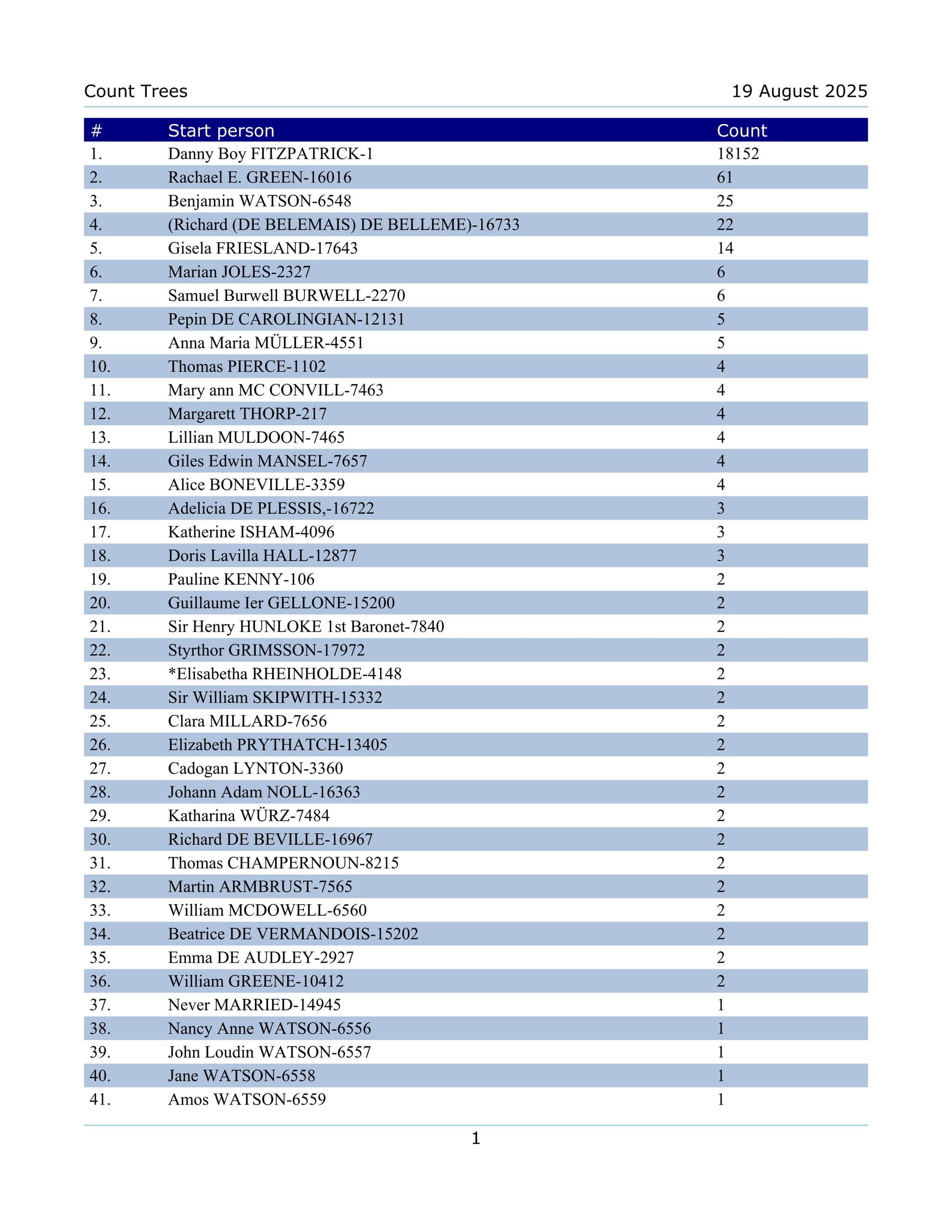
after running the how many trees in database it has a lot of #1 assume that is 1 person question can i safely delete them thank you
If, on inspection of the sole member, you’ve no interest in them, then delete away.
1 Like
click on a tree and see the number of people and consider if they should be part of your main tree before deleting. Backup your file first.
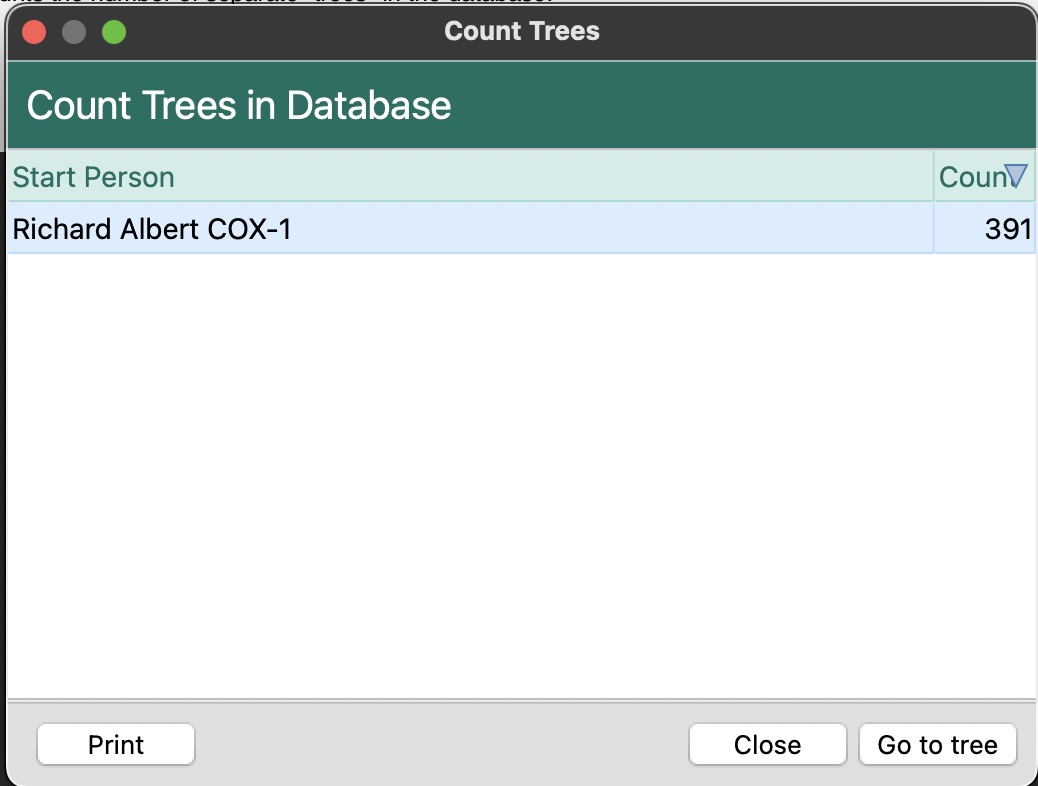
do i have to delete(select) each person to add the tree to groups than delete all
Your marked up question is good? It is perhaps tedious and cumbersome to go through Count Trees, select a tree of 1, go to tree and delete the person if the number of such single-person trees is more than a few. The second way could be more efficient if there are many such trees, provided you make a rules-based group and then delete everyone in the group. The criteria would be:
Number of children → equals → 0
AND
Number of spouses → equals → 0
AND
Number of sets of parents → equals → 0
There are also criteria for Number of siblings and Number of shared facts which you could throw in for good measure. That’s quite a few clicks to set up so I’m not sure what the breakeven point would be.
1 Like
I have quite a few trees of one person. Often they are people of interest, that may fit into my main tree in the future. Or they may be part of one-name studies. At other times, they are data entry mistakes, which most of us would want to delete. Extra trees do not cause problems in one’s RM file, so if you’re unsure about leaving someone in, you might want to keep them. I would avoid bulk deletes without inspecting the entries carefully.
Tom thank you for the answer i like the group thing,i am only learning how to group and having a problem with rules maybe if you could help led me down that path it would be much quicker as i have a lot of trees when i delete a group the people still there i have changed my want now i only want direct people not children
From “Tom Holden via RootsMagic Community” <notifications@rootsmagic.discoursemail.com>
To fitzpatrickdan4@gmail.com
Date Thu 14 August 2025 6:30:13 PM
Subject [RootsMagic Community] [RootsMagic] Question Roots magic 10
Just do a simple group. Print a list of the Count trees results to know which trees you want to keep or not. Turn the RINs on under Settings, General Settings, Number to display so they appear on your report. That will help you pick those to work with.
Select to create a Simple group. Click on Mark and select “Everyone in file”. Then highlight someone in a tree that you are keeping. Click on UnMark and select “Everyone in highlighted person’s tree”. Do that to every separate tree you want to keep. Removing them so they are unchecked in the list. When done only those trees you want to delete will remain. Now you can use the “delete everyone in a group” option. Make a backup before you delete.
1 Like
Individuals who are “friends, associates, neighbors” will not be included in the tree of the person with whom they are associated. So before you start happily deleting single person trees, make sure they aren’t in somebody’s FAN club.
thank you, Chery, no one has been deleted yet as i don’t know how from a Groupe putting all my trees (more than 2 people) into gropes to figer what to do from there
@Dan also wanted to note that I would personally just look at each person I was going to get rid of and if not needed just delete them on the spot-- unless you downloaded a lot of info from Ancestry or FamilySearch, you had them in there for a reason-- I did a quick check on my Mom’s database–there were a few that I have no idea why they are there-- a few are mistakes such as my nephews wife was NOT attached to the family–most however were 1 names studies that had more info on their lines in the notes so that I could make the lines larger if I wanted.. the 1 name studies being people who MIGHT be related to my lines such as my German g-grandpa had a unique 1st name–lived in a big city-- all BUT 2 of the people with the same 1st name/ last name in the time frame are his descendants–I suspect that one of those 2 is either a son by a previous unknown marriage or nephew.
Another example is g-grandpa’s brother-in-law – the only person in the 1880 US census with
this particular last name–so when I run across a person in say the 1920-1950 census or cemeteries within a 50 mile radius of this city, I always add the info as I am pretty sure they are a cousin BUT may NOT have the time right then to follow up on it especially if they are living.
thank you, Nancy, what my plan is/was to only have direct people g fathers/g mothers di not want children trying to make a separate file just for them people i am learning thanks to people like you who helps me in layman terms
Maybe now and even after many years of research, you will decide that you only want to print out direct line ancestors to share. That is a perfectly ok goal. However, those of us who have researched perhaps 20 or 30 years, have discovered the the most productive clues often come from exploring the families of children, siblings, families of spouses, etc. Old wills, land records, cemetery records in locations of interest, old histories of regions often list information that becomes relevant over time. If you only look at possibly direct line individuals as you research, you are severely limiting the small clues that in the long run add to successful research. A RM database can contain way more information than you will likely find, so having people now unrelated to your known direct line causes no harm and far down the road may provide you with really valuable information.
I used to put notes on people of interest in files in a file cabinet rather than adding them to my regular database. But paper files can grow to the point we are unable to find anything in them because of the volume of information. Having those people of interest in our own databases, can help in making use of this type of research down the line, far in time from the clues we turned up. What we think means nothing to us today, can become valuable to our research later.
1 Like
i have worked on my tree for over 30 years and i do understand what u r saying i will never change my original with over20,000 people was making another with just direct people thank u for the feed back
So @Dan
Abt how many 1 person trees do you have-- a ton of them or say abt 50 ?
okay I get you are making a separate file and keeping the original BUT how did you make the separate file-- drag and drop/ gedcom, copy database, treeshare or a family search file downloaded or manually?
Gedcom and a drag and drop both can have some losses of info BUT on both, you could have moved JUST direct ancestors of a person-- then say that you also wanted to add your siblings, you could do that also.
see GEDCOM & DnD transfer losses
you could actually try this out and see how it works–just name it for now something like testing or testing Joe Blow family --then compare the test database with your old database to see if or what you might have lost–if you like it, then just change the name–if you don’t like it, just delete the TEST DATABASE–make sure YOU BACK UP your old file BEFORE doing anything
BTW–are you on Windows or a MAC and is your RM 10 version a 32 or 64 bit?
ver 10 windows what u have suggested is just now what i am doing a new file with just direct people copied them over to new file that is the name new file i did a relations than i color code all the Grands than started copy them over the original file i do not touch maybe about 50 1 person trees
From “Nancy Kessler via RootsMagic Community” <notifications@rootsmagic.discoursemail.com>
To fitzpatrickdan4@gmail.com
Date Mon 18 August 2025 4:37:41 PM
Subject [RootsMagic Community] [RootsMagic] Question Roots magic 10
(Attachment Count Trees.txt is missing)
@Dan sorry couldn’t see your attachment-- not sure BUT think probably that when you reply by email, it does NOT allow attachments.
Anyway fifty 1 person trees is NOT bad if you are done moving everybody to the new database and are happy with the results of the new database–in that case I would just delete them 1 by 1 as you will probably spend as much time trying to creating a group–just make sure to BACK UP your database1st–
either way you do it, go to your settings ( left side) and under the icon that looks like a gear, you will see NUMBER TO DISPLAY—select RIN
Then run your count tree and hit print-- the 2nd icon will print to a file–pdf, word, text ect
( suggest pdf ) that you can save to the desk top-- the number right after the person’s name is the RIN number

You can use the RIN # instead of a name to easily locate the person in the index and then delete them or use the RIN to add to a Simple group, then delete everybody in that group–Just keep in mind that once you delete someone, the only way you can get them back is to drag and drop them from the old database to the new one

IF you delete them one by one, I suggest that after you do 15 or 20 , you backup the database–close RM down then open it again–that way you avoid an argument out of range error-- you don’t lose any info if you get this error-- they are just annoying when you are trying to do something BUT if you get one you have to close out RM and reopen as it will keep happening over and over until you do and can cause other errors