I am using Rootsmagic v11.0.2.0. It’s counter intuitive, but pressing publish allows me to connect to my Ancestry tree, and download all the data including media. This is a great thing so i have a backup of my tree for when I am offline.
My question is, how once I’ve finished working on my tree offline, can I publish that new info back to Ancestry.com?
I spent days of working and had to dump everything I’d done because I could find no way to add it to Ancestry. Help please?
You used Publish > Ancestry TreeShare to copy all your data from Ancestry to RM. You also use Publish > Ancestry TreeShare to copy all your data back to Ancestry. However, when moving the data back, TreeShare shows you the various differences between RM and Ancestry and you will need to approve each difference to be copied back to Ancestry as a separate click. It can be very tedious, but that really is the way it works.
1 Like
OKay, but how do you get it to go the opposite way? I can only copy from Ancestry to RM at the moment?
Any changes you make in either RM or Ancestry just click on the box “Only Show Changed People” and you will get the list of people changed.
Pick a name and in the side window will be the “<” that indicates that is what has been changed. Click on the entry and either update RM or Ancestry.
Not only is there nowhere at all to link RM back to Ancestry, but I just ‘published’ 3 times in succession to that changes I made in Ancestry propagate to RM11. But they haven’t. So something’s wrong somewhere.
I cannot find anywhere in the screens that says “Only show changed people.” Can you give me a hint as to where it’s supposed to be?
Top left-hand corner
1 Like
Use the tree share button to open tree share. See below (sorry I can’t write with a mouse!).
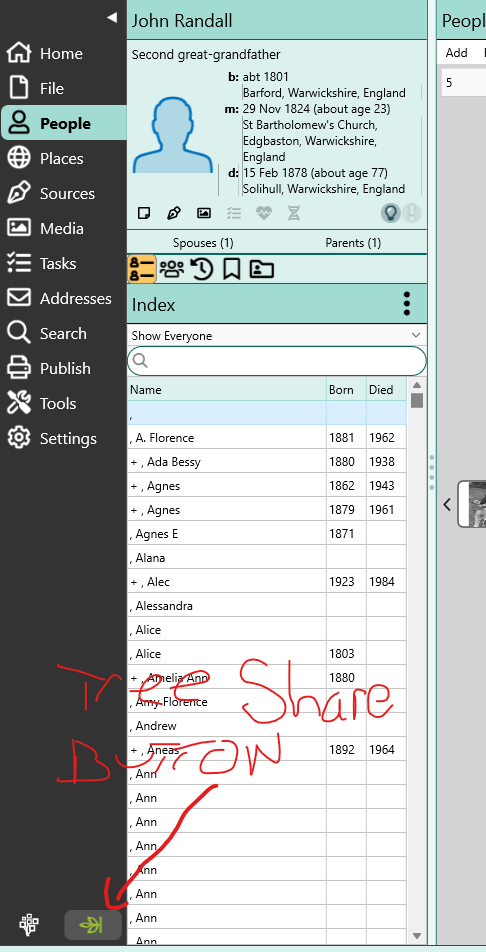
Then click the ‘only show changed people button’ in the tree share box that opens:-

Click on one and you get this showing any differences between RM and Ancestry - click the < symbol to get the dialogue allowing you to update one from the other. If you want to update Ancestry from RM use the < symbol under RM and vice versa.

Hope that helps.
2 Likes
Treeshare works great but can be quite tedious to maintain change both ways depending on how you operate (RM or ANC side). One thing to take note of is Media – Media will be name cryptic file name by ANC - it will also download separately in a diff media folder not your default media set up in the program.
I’m not sure that tedious is quite the word I’d choose to describe the process. Unlike a full sync it gives you the option of double checking all the changes you made in the other program individually. I find that particularly useful after accepting (particularly census and BMD index) hints in Ancestry. It took me a while to realise that if you accepted a census fact for a person in Ancestry when they were living with (say) a father and second wife Ancestry creates a second set of parents for all the children selected. Likewise if you already have a marriage fact for a couple and Ancestry has a marriage BMD index hint for one of them, Ancestry creates a second marriage fact with an unknown spouse unless you untick the person. It then just downloads the source and you can add it to the existing fact. Using tree share helps me avoid these three card tricks when I have made a mistake so I appreciate it.
1 Like
I think others have already answered the question, but here is a different way to look at it.
When you start out using TreeShare, you either copy an entire Ancestry tree to what was an empty RM database, or else you copy an entire RM database to what was an empty Ancestry tree. So it feels like you have a direction established, either from Ancestry to RM or else from RM to Ancestry. And now you want to go in the opposite direction.
But after the initial copying is complete, don’t think of it as the “same direction” or the “opposite direction” anymore. Just think of it being in either direction or as being in both directions. What happens is that after the initial copying, TreeShare will show you your RM data and your Ancestry data side by side, and it will show you where they are different. For each separate piece of data where they are different, you click to indicate whether to copy that particular piece of data from RM to Ancestry or from Ancestry to RM. There is not an option just to copy everything from RM to Ancestry that doesn’t match or to copy everything from Ancestry to RM that doesn’t match. For each individual piece of information that doesn’t match, you click to indicate which direction to copy. There is not a “same direction” or “opposite direction”. You just choose a direction for each piece of data that is different.
You may already know that you have been working only in RM and that you want to copy all your RM changes to Ancestry. But I repeat: that process doesn’t exist. The only process that exists is for TreeShare to show you the differences side by side and for each difference you click to tell TreeShare which direction to copy. Some RM users find this process to be very tedious. Some do not. Some TreeShare users would prefer a “copy everything that’s different from RM to Ancestry” process or a “copy everything that’s different from Ancestry to RM” process, and other TreeShare users prefer the process the way it is. But irrespective of your preferences, it works the way it works.
There are two different ways to initiate TreeShare. One way is to click the TreeShare icon at the bottom left of the main screen. The other way is via Publish > Ancestry Tree Share. It doesn’t matter which way you initiate it. The result is the same either way.

Here is a video on the workings of Treeshare. It was made in v7 when it came out but hasn’t changed at all in newer versions.

1 Like
Thank you everyone for taking the time to reply.
I think I have it now, the video I watched must have been an older version. So now, if I have changed/added 100 people’s records in Ancestry, every single line of that record that has been added or changed needs to be added individually to RootsMagic. I’ve just been trying it and after 10 minutes I’ve updated 3 people’s records. I have about 300 to do. So that means about 16 hours sat here clicking as if my life depended on it!
I agree when someone said tedious. I would add torturous, and also ridiculous.
Here’s a much better and much more efficient way for the Ancestry to RM changes: delete your tree in Rootsmagic and download it all over again. 3-4 minutes, all done.
Since the purpose of using RM is for when I am offline and want to upload to Ancestry at a later date, I guess I just have to suck it up and waste considerable amounts of time editing.
I don’t mean to be mean but does anyone know a better program than RM to use? A simple, 1 click sync would make much more sense.
I have found that doing smaller numbers of people, like a family unit, then sync changes works 
I’ve added about 4 dozen people just in the last 2 days. I think if I stopped at every half dozen and synced them it would become tedious but also it would hamper my ‘flow’. Although to be fair adding a new person is way easier than adding changed info on an existing person.
But nevertheless it’s an extra level of work that’s unnecessary really. I think my work flow will be that every week or so depending on how much adding I’ve done in Ancestry, I’ll just import the whole tree as a new tree into RM, that way it only takes a few minutes and I don’t make a mistake fiddling with updating people.
I hear the comments about making sure you add correctly and that’s why they force you to do it 1 by 1, and everyone will find the best way for themselves. But in Ancestry it’s pretty easy to be accurate and the Protools is excellent for finding inconsistencies so you can change them before syncing. My Heritage also has some built in tools to help you filter little mistakes out.
So for me, ideally I’d love a 1 click sync that would just sync to or from Anc and RM. Reimporting the Anc database every week is about as close as I’ll get to that I think.
48, WOW that is a lot of relatives, how do you do that? I think everyone would like to know.
There are tons of mistakes in large shared databases such as in Ancestry, MyHeritage, FamilySearch, Geneanet, etc. That applies to the “hints” that show up in Ancestry databases as well. Of course if one is using a published genealogy that appears to be well researched, published vital records, census for a particular location to add new family, one can access the accuracy of where the names came from and their likelihood to be accurate to a better degree. I cringe when I see threads such as this because it appears so many mistakes we find online are duplicated from one database to the next. Of course even sources such as vital records and wills can contain errors. Over the years I have seen people argue that because the same “facts” are in numerous databases, that they must be correct. Sometimes it is the source that is actually unique that turns out to be the truth. Personally I do not use Tree Share. I do make use of Family Search at times, but I find lots of mistakes there as well. Adding names from any one source – no matter where the names come from –can be evaluated better if one sticks to to working on small family groups.
I’m not sure if you’re taking the pee or not. How is 48 relatives a high number? My great, great grandfather had 13 kids, each of them had at least 3 kids each. That’s more than 40 all from 1 man. Another relative had 17 kids and 2 of them went on to have 13 and 14 kids. That wasn’t unusual in the 1700’s-1800’s.
48 is only a small part of my tree.
I think there’s a disconnect here.
I agree 100% many family trees share the exact same error over and over because they haven’t bothered to check a birthdate, or parent or whatever. When you come to a person who has no official documents you’ve got very little to go on so that part of the tree goes dormant for a period of time.
These problems are not compounded by Treeshare though. Treeshare allows you to share your own private tree with RootsMagic software on your computer. So the only mistakes you’ll ever copy to your Rootsmagic are the ones you make yourself.
Rootsmagic is great though for managing your tree while offline, which is why I am trying to gain a better understanding of it.
Well lucky you. My relatives weren’t as prolific as yours so finding 48 compared to my 4 or 5 is a lot.
Just asking.