I have added correct relationships using birth and step children in Roots Magic 11. When I create narrative reports, the children show up under both the birth and step parents which I can probably live with adding a note to explain. The problem is that the list of generation; parent grandparent, etc defaults to the step father instead of the birth father; that is a problem. Any ideas how to address short of removing the step parents which is not an option.
I believe whichever parental pair is showing on the Family view screen for the target children will determine the report basis in many instances.
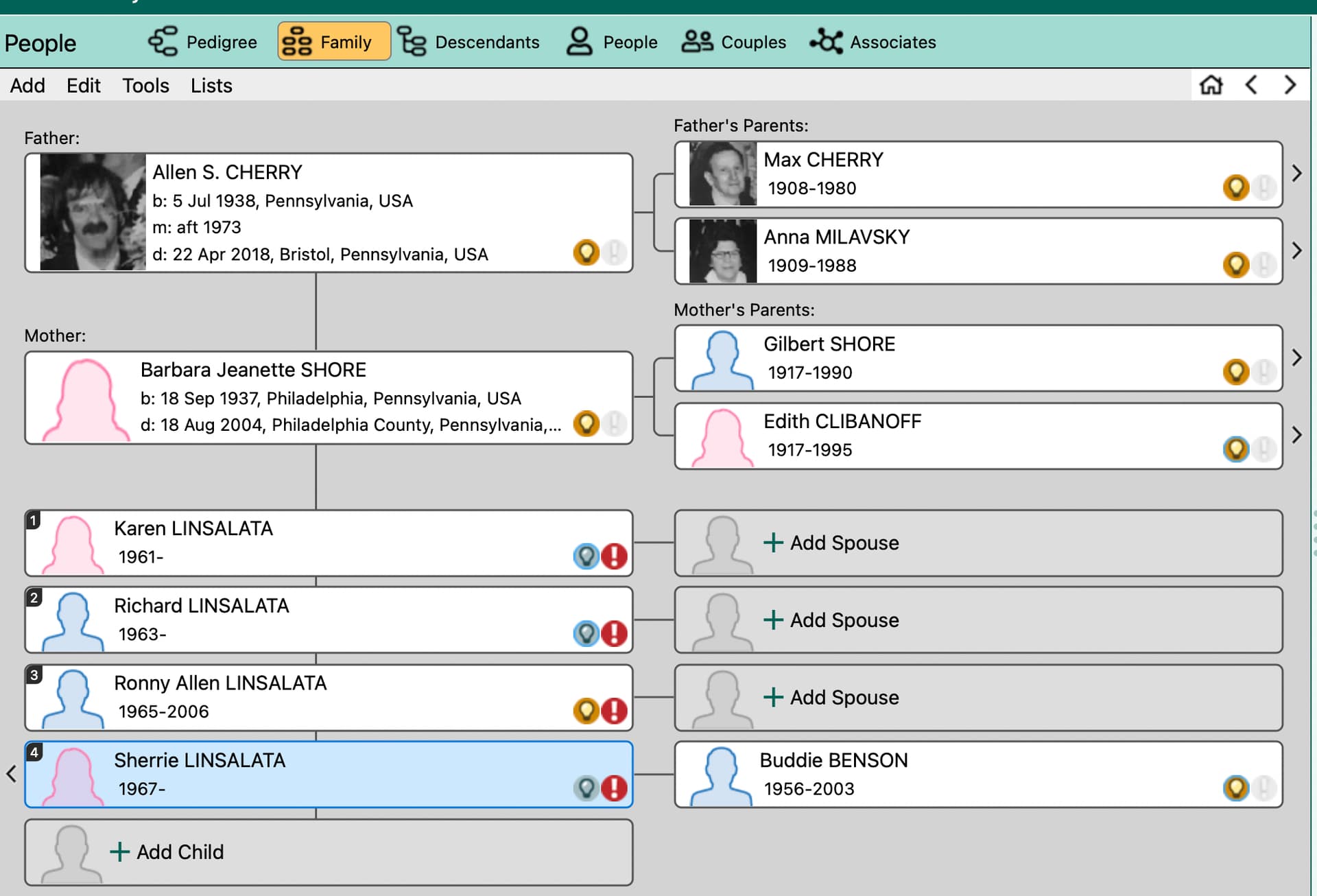
Both parental pairs appear on the family view screen. See example. Sherry is one of my second cousin Allen’s step daughters. I grew up with her and consider her “family” even though no blood relation. Her birth father David is listed as her father, Allen as step, but the narrative report only shows Allen and his genealogy. I want her and her siblings in the narrative report. If I remove Allen as her step father, there is not way for her to appear in the report. This is only one example; I have a lot of “relatives” where this is a problem. Suggestions?


Hmm, I’m still on RM10, but the Family view I’m thinking of only shows one pair of parents at a time:

Here is a screenshot from RM 11. I hope it is visible. It shows the new family view with both fathers, David birth and Allen step. If I remove Allen, Sherrie and her siblings will not show up in the narrative report at all since they are not technically related to me. I am sure complex relationships are common and I would think Roots Magic would have a work flow to address this.

I now see what you are talking about. Allen shows up here, not the birth father. I will try to edit but I fear if I remove Allen, the children will not show up in my narrative report at all.
When in the Family View, try clicking on the person that has 2 wives, then on the side panel you should see spouses (2), click on that and switch the spouse to the one you want.

1 Like
Is Barbara Jean Shore related to you or Sherry’s actual father David ? Basically what you have to realize is that RM ( and evidently other programs?) give you the option to mark someone as a step/adopted parent ETC but if you do, there are no other advantages to it–it’s basically for your info-- when you run a report, the step parent is listed as if he is the father and if you run a kinship report, the stepfather’s parents, siblings, grandparents etc are listed as the child’s actual father, grandparents, aunts and uncles etc beside their biological father, grandparents etc..
Your problem is a little bit unique as you don’t seem to be related to Sherry’s biological mother and father–if you were, you MIGHT be able to get the right lineage on Sherry by focusing on the parent you are related to..
The only work around I can see is to run 2 reports on Sherry-- the one with her biological parents and the other with Allen-- open the reports in the editor of your choice and then edit Sherry’s info…
Sorry-- it’s not RM’s fault-- it’s just seem an area that genealogy programs have not or can NOT address even though the issue goes back to abt the beginning of time…
Thank you for spelling out the problem better than I could! I am related to Alan, the step dad, not to either of Sherry’s birth parents. I knew the children (now adults) personally and wanted to have them and their descendants in the narrative report for my updated Genealogy book. This is one of many examples in this family line; there were lots of step and adopted children, some changing surnames, some not. I was hoping a program as good as RM would have figured out some way to deal with this common problem. I guess the only way for now to have them show up in the narrative report for the family line is to leave Alan as the “father” and add a notation in the printed Word document about the birth father. I could change the kinship by hand as well. The problems are this is only one example and how to keep track of all of these changes every time I update the narrative report.
Thanks. If I change the spouse in family view, I will no longer have direct lineage to the children and they will not show up in the narrative report. What I really need is a way to have both fathers, in my example, birth and step, show up in the same narrative report. Apparantly RM cannot do this at this time.
1 Like
Think I would add them to a group and /or color code them as I found them-- that way, you would know who to check every time you needed to update the narrative report
1 Like
Thank you; I am still trying to figure out color coating; I am probably doing something wrong but whenever I create a new color, it deletes the ones I already have!
@gsk326 I’m NOT an expert on color coding BUT do NOT think you are deleting the ones you already have UNLESS you are using the same color for each group..
If you color code your 1st group using Color code set 1 then color code your 2nd group using Color code set 2, it will look like your 1st bunch of colors all disappeared BUT they didn’t because your focus now is on color code set 2..
You have to remember that a person can have different color coding ( up to 10 colors) BUT only 1 will show at a time and that would depend on what color code set you are on-- you can have different color show up at the same time such as 1 color for males and 1 for females IF they are in the same color set…
Here is so additional info on color coding to check out
PS-- the reason I said to use groups and then color code them is because groups are refreshable and then you can just refresh the color coding to add a new person
1 Like
The big problem here is that you are trying to use a genealogy program to do family history. They are two different pursuits and not always compatible with each other. Genealogy is genetic/blood related, family history is family related. The former does always deal well with things such as step families.
1 Like
Thank you. I do understand. I created a Family Genealogy book using RM 10 Publisher and had it published last year. I am now working on the second edition. I did not address steps and adoptions in the first edition, but the feedback from my extended family was that they would like this additional “family” included in the second edition if possible.
1 Like